The Art of 3D Layered Snowflakes: A Complete Guide to Digital Cut Files and Creative Assembly
As the winter season approaches, crafters, educators, and decorators alike begin searching for unique ways to capture the magic of snow indoors. While traditional paper snowflakes are a nostalgic staple, modern technology has elevated this classic art form into something far more intricate and durable. The Layered Snowflake represents a fusion of digital design and tactile craftsmanship, offering a sophisticated alternative to flat paper cutouts. Whether you are a seasoned maker with a workshop full of equipment or a beginner armed with nothing but scissors and enthusiasm, understanding how to utilize digital cut files for 3D assembly opens up a world of creative possibilities.
This guide explores the concept of layered snowflakes from the ground up, explaining not just how to make them, but why they have become a significant trend in modern DIY culture, education, and small business product lines.
Understanding the Digital Foundation
To truly appreciate the versatility of layered snowflakes, one must first understand the medium. This product is entirely digital, meaning it exists as data before it becomes physical art. When you acquire a layered snowflake design, you are typically receiving a ZIP folder containing organized assets designed for maximum compatibility across different platforms and skill levels.
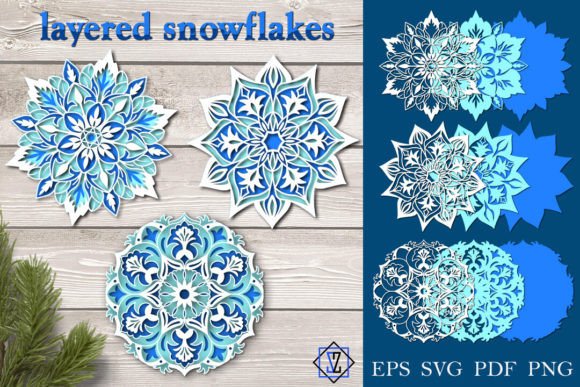
A high-quality digital package usually includes three distinct folders. The first contains general files in SVG, EPS, and PDF formats, which often group all layers together for batch cutting. The second and third folders separate each individual layer into its own file, available in SVG, EPS, PDF, and PNG formats. These individual files feature transparent backgrounds and are rendered at 300 DPI in RGB color space. This technical specification is crucial: 300 DPI ensures crisp edges when printing, while RGB provides vibrant color accuracy for digital displays and modern printers. The transparency allows for seamless layering without unwanted white boxes interfering with your design.
Why File Format Matters
Beginners often ask why so many formats are necessary. The answer lies in hardware compatibility. SVG files are scalable vectors ideal for cutting machines like Cricut or Silhouette, as they maintain perfect lines regardless of size. EPS files serve professional designers using Adobe Illustrator. PDF is the universal standard for home printing and manual cutting templates. Finally, PNG offers a rasterized option for those who simply wish to print and cut by hand or use the image in digital scrapbooking. Understanding these distinctions prevents frustration and ensures you select the right tool for your specific workflow.
From Screen to Physical Object: Cutting Methods
One of the most significant advantages of layered snowflake designs is their accessibility. There is a common misconception that digital cut files require expensive machinery. In reality, the design philosophy behind these snowflakes supports multiple fabrication methods.
- Specialized Cutting Machines: For production-level crafting or business owners, automated cutters provide precision and speed. The vector paths in the SVG files guide the blade perfectly, ensuring every intricate lattice aligns during assembly.
- Scrapbooking Knives: For hobbyists who enjoy meditative, detailed work, a sharp craft knife and a self-healing mat offer total control. This method is excellent for smaller, intricate centers where machine blades might struggle with delicate paper fibers.
- Paper Scissors: Do not underestimate traditional tools. Many layered snowflake designs include outer layers with simpler silhouettes that are easily managed with fine-point scissors. This makes the craft accessible to classrooms and families without tech budgets.
Beyond paper, these digital files unlock industrial applications. Because the designs are vector-based, they can be scaled up significantly for laser cutting or CNC routing. Materials such as plastic, plexiglass, and plywood transform a temporary holiday decoration into permanent architectural signage, retail window displays, or durable ornaments. A plywood version might serve as a rustic wedding centerpiece, while a plexiglass iteration could function as modern corporate branding during the holiday season.
The Assembly Process: Creating Depth and Dimension
The defining characteristic of this product is its three-dimensionality. Unlike a standard snowflake that lies flat against a window, a layered snowflake occupies physical space. The assembly process is an exercise in spatial reasoning and patience. You must cut out each layer individually, then connect the centers to build volume.
This connection is typically achieved using foam tape, glue dots, or small spacer beads placed between layers. The separation creates shadows and highlights that change depending on the lighting and viewing angle. This interplay of light and shadow is what gives the piece its lifelike quality, mimicking the crystalline structure of real ice. For educators, this assembly phase serves as a practical lesson in geometry, symmetry, and fine motor skills. For therapists, the repetitive nature of aligning and stacking layers can be a grounding mindfulness activity.
Practical Applications in Modern Life
The relevance of layered snowflakes extends far beyond seasonal decoration. In the context of the creator economy and small business, these digital assets represent a low-overhead product line. Crafters can purchase the digital file once and produce unlimited physical inventory, adjusting sizes and materials to suit different market niches. A single design can yield premium acrylic jewelry, budget-friendly cardstock gift tags, and mid-range wooden wall art.
In educational settings, layered snowflakes bridge the gap between STEM and art (STEAM). Students learn about radial symmetry, fractals in nature, and structural integrity. Moving from a 2D screen to a 3D object helps develop spatial intelligence, a critical skill in engineering and architecture. Furthermore, because the files are digital, teachers can modify the complexity of the design to suit different age groups, making it an inclusive activity for diverse learning environments.
Essential Considerations Before You Begin
While digital crafting is empowering, it requires preparation to avoid common pitfalls. Adhering to best practices ensures a smooth experience from download to display.
- Software Compatibility: Before purchasing any digital asset, verify that you possess the correct software to open and manipulate the files. Owning a cutting machine does not automatically grant access to all file types; ensure your specific model supports SVG or DXF inputs.
- Hardware Verification: Confirm that your equipment can handle your chosen material. Cutting 3mm plywood requires vastly different settings and blades than cutting 80gsm paper. Test cuts are mandatory to prevent wasted material and damaged equipment.
- Color Management: Please note that printed colors may differ from the original screen display. Monitors emit light (RGB), while printers reflect light (CMYK). Always check and set up your equipment’s color profiles, and perform test prints to calibrate expectations. What looks neon blue on screen may print as a muted teal.
- Licensing and Usage: Understand the terms of use. Most personal-use licenses prohibit selling the digital file itself, though selling the physical end product is often permitted. Respecting intellectual property sustains the designer community.
Building Broader Creative Confidence
Engaging with layered snowflake projects does more than produce a beautiful object; it builds digital literacy and creative confidence. Users learn to navigate file systems, understand resolution and color spaces, and troubleshoot mechanical issues. These skills are transferable to other areas of digital fabrication, from 3D printing to vinyl signage.
Furthermore, the act of creating something tangible in an increasingly virtual world provides psychological balance. The tactile feedback of paper, wood, or plastic grounds the user, offering a sensory break from screens. Whether you are decorating a storefront, teaching a class, or simply seeking a peaceful evening project, the layered snowflake serves as a versatile vessel for expression.
Final Thoughts and Support
The intersection of traditional craft and digital technology has revitalized the art of papercutting, making it more accessible and versatile than ever before. By understanding the technical specifications, respecting material constraints, and embracing the assembly process, anyone can create stunning 3D layered snowflakes that transcend simple decoration.
If you are ready to start your project, remember that preparation is key. Ensure your software and hardware are compatible, manage your color expectations, and take joy in the process of bringing digital lines into physical reality. Thanks for visiting my store. If you have any questions regarding file compatibility, material recommendations, or assembly techniques, please contact me, Svetlana. Happy crafting!